Despite years of talk about the paperless office, a large share of business information still arrives as documents. Supplier invoices land in a shared inbox as attachments. Delivery notes are photographed on a phone. Contracts, application forms, bank statements and receipts pile up, and someone has to open each one, find the important details and type them into another system.
This work is slow, repetitive and surprisingly error-prone. A misread digit on an invoice can mean a wrong payment; a missed renewal date in a contract can cost far more. Document AI, a combination of text recognition and language models that understand what a document says, is changing how this work gets done. Used well, it turns paperwork into structured data that flows straight into the systems a business already runs on.
01Beyond scanning and templates
Older approaches to document processing worked in two steps. First, optical character recognition converted an image into text. Then templates told the software where to look: the invoice number is always in the top right corner, the total is always at the bottom. That works for documents that never change, but it breaks the moment a supplier redesigns its invoice or a customer fills in a form by hand.
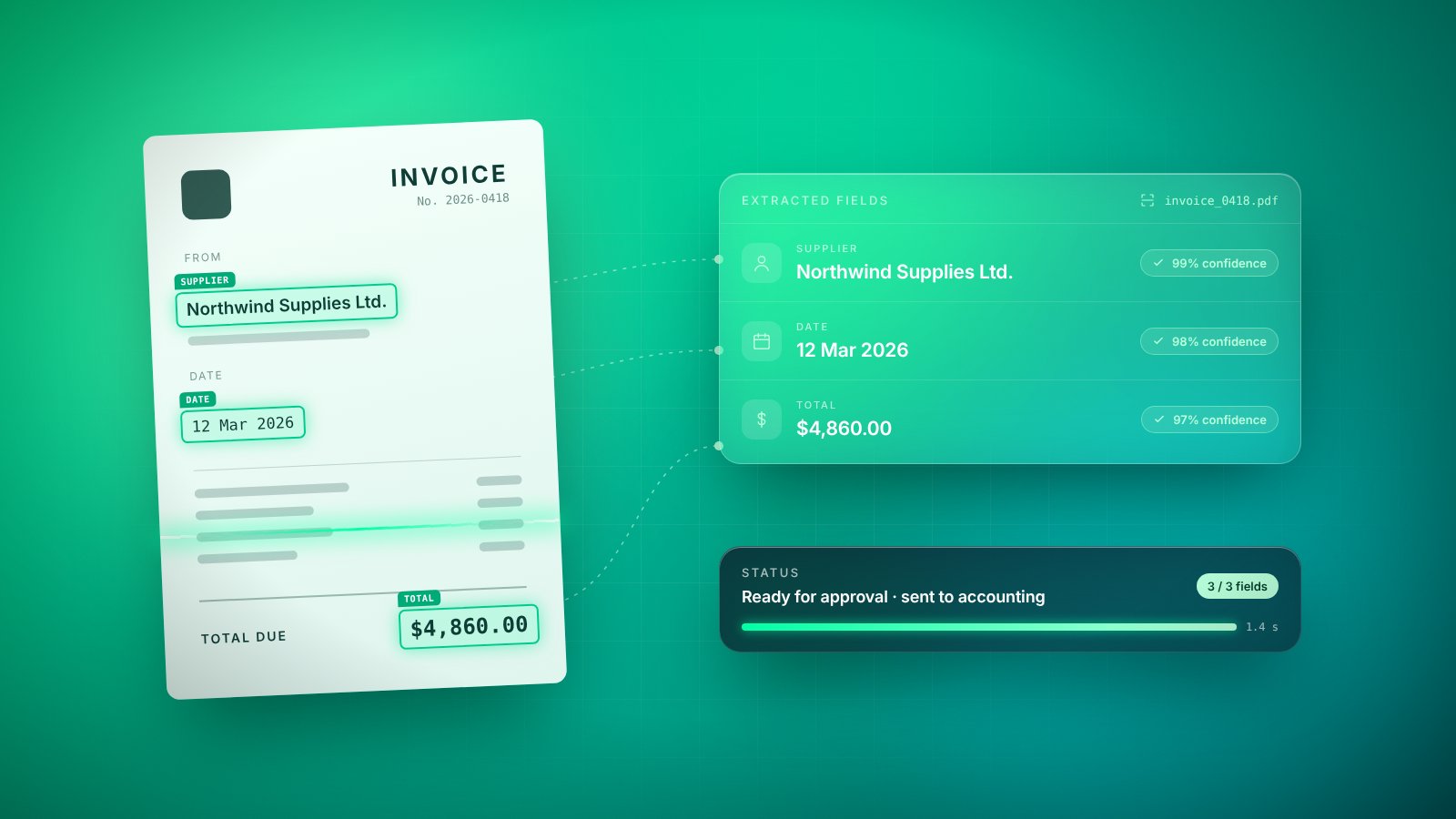
Modern document AI reads more like a person. It recognizes that a figure labelled “amount due” is the total, wherever it appears on the page. It can tell a delivery address from a billing address by context, understand a table that spills onto a second page, and pull the notice period out of a paragraph of contract language. Instead of hundreds of brittle templates, one model handles many layouts.
The value isn’t in reading the document. It’s in what happens next, when the data arrives clean, checked and in the right place.
02Where it delivers value
Almost every department handles documents, but some processes benefit more than others. The strongest candidates combine high volume with clear fields and a downstream system waiting for the data:
- Accounts payable: supplier, dates, line items and totals extracted from invoices and matched against purchase orders.
- Onboarding: customer or employee details captured from forms and identity documents into the right records.
- Contracts: key terms, parties, renewal dates and obligations summarized so nothing important is missed.
- Logistics: delivery notes, packing lists and customs paperwork turned into shipment updates.
- Expenses: receipts read from photos and coded to the correct category and project.
In each case the goal is the same: people stop retyping and start reviewing. The side effects matter too: faster payment cycles, fewer late fees and a searchable record of what every document actually contained.
03Accuracy, confidence and review
No document system is perfect, and pretending otherwise is the quickest way to lose trust. Good systems report a confidence score for every field they extract. When the model is sure, the data can flow through automatically. When it is uncertain, because the scan is blurry or a field is ambiguous, the document is routed to a person who sees the original next to the extracted values and can correct them in seconds.
Confidence scores work best when combined with business rules. Does the invoice total equal the sum of its line items plus tax? Does the supplier exist in your records? Is the date plausible? These checks catch errors that a model might make with high confidence, and they are cheap to add.
04Security and privacy
Documents are often among the most sensitive data a business holds. Invoices reveal pricing and bank details, onboarding forms contain personal information and contracts hold confidential terms. Before adopting document AI, be clear about where documents are processed and stored, who can see them, how long they are kept and whether they are used to train anyone’s models.
Apply the same principles you would to any system holding personal or financial data: limit access by role, encrypt data in transit and at rest, log who viewed or changed what, and delete originals according to a defined retention policy. Payment details deserve particular care, since a manipulated invoice is a common fraud technique.
05Getting started without the hype
Start with a single document type that arrives often and causes real pain, such as supplier invoices. Measure the current process first: how many documents arrive, how long each takes and how often errors occur. That baseline is what will make the improvement visible later.
Then focus on the whole flow, not just the extraction. Where do documents arrive? Where should the data go? What happens to exceptions, and who owns them? A system that reads invoices perfectly but still requires someone to copy the results into the accounting system has saved very little. Integration with the systems you already use is usually where most of the value, and most of the work, lies.
Finally, be cautious of claims of full automation from day one. A realistic target is that most routine documents pass through untouched while unusual ones get a quick human check. As accuracy improves and confidence grows, the share of documents needing review naturally falls.
06A different kind of back office
Document AI does not remove the need for people in finance, administration or operations. It changes what they spend their time on. Instead of retyping figures, they handle exceptions, resolve disputes, spot patterns and improve processes. That is more interesting work, and it is where their judgment is genuinely needed.
The paperwork will not disappear any time soon. But it no longer has to be the bottleneck. When documents become data the moment they arrive, the back office stops being a place where information waits and becomes a place where it moves.
Key takeaways
- 01Document AI reads the meaning of a document, not just its characters, so it copes with varied layouts.
- 02Start with one high-volume document type and measure accuracy against your current process.
- 03Use confidence scores and validation rules to decide what is processed automatically and what a person reviews.
- 04Treat documents as sensitive data: control access, retention and where processing happens.