Ask a technical team how a new application should run in the cloud, and you may hear a flurry of terms: virtual machines, containers, orchestration, functions, serverless. Each option has passionate supporters, and the discussion can quickly become hard to follow for anyone who simply wants the software to work reliably at a sensible price.
The good news is that the core ideas are not complicated. All three approaches answer the same question, “where does our code run?”, but they divide responsibility differently between you and the cloud platform. Understanding that division is enough to have a useful conversation and make a confident decision.
01Virtual servers: your own computer in the cloud
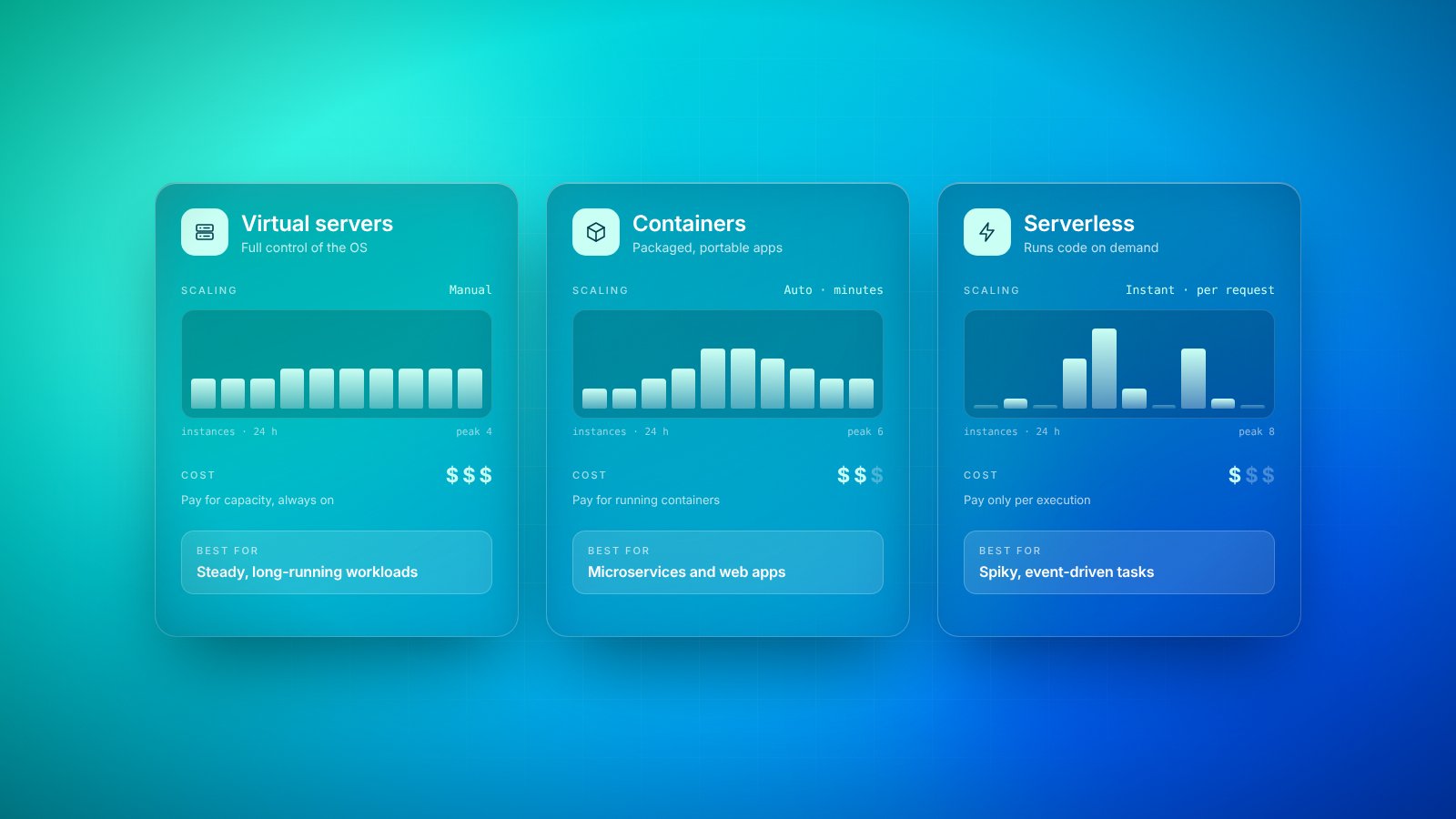
A virtual server is the most familiar option. It behaves like a physical computer: it has an operating system, memory, storage and a fixed amount of processing power. You rent it by the hour or month, install what you need and run your software on it, much as you would on a server in your own office.
The advantage is control. You can install almost anything, configure it exactly as you like and move existing software onto it with few changes. The downside is that you also own the chores: updating the operating system, applying security patches, monitoring disk space and deciding when to add more capacity. A virtual server also runs, and costs money, whether it is busy or idle.
02Containers: software in a standard box
A container packages an application together with everything it needs to run, such as libraries and settings, into a single standard unit. Think of it like a shipping container: whatever is inside, it can be moved and handled in the same way. A container that works on a developer’s laptop will behave the same way in testing and in production, which removes a whole category of “it works on my machine” problems.
Containers are lightweight, so many can run on the same underlying server, and they start in seconds. For larger setups, orchestration software manages them automatically: starting more copies when traffic rises, restarting any that fail and spreading them across machines. That power comes with complexity, and running an orchestrated environment well requires real expertise. Managed container services reduce the burden, but someone still needs to understand how the pieces fit together.
03Serverless: just the code
Serverless computing does not mean there are no servers; it means you never see or manage them. You write small pieces of code, often called functions, and the platform runs them whenever something triggers them: a web request, an uploaded file, a new order or a scheduled time. When nothing is happening, nothing runs, and you typically pay nothing.
The real question is not which technology is best, but how much of the machinery you want to own.
Serverless scales automatically, from zero to thousands of requests, without anyone planning capacity. It is ideal for irregular or event-driven work, such as processing form submissions, resizing images or sending notifications. The trade-offs are less control over the environment, limits on how long a function can run, occasional short delays when a function starts after being idle, and a closer tie to the specific platform you build on.
04Comparing the trade-offs
No option wins on every dimension. Looking at a few practical factors side by side usually makes the choice clearer:
- Control: virtual servers offer the most, serverless the least, with containers in between.
- Maintenance: serverless removes most operational work, while virtual servers leave it all to you.
- Scaling: serverless scales automatically, containers scale well with orchestration, and servers need planning.
- Cost pattern: servers cost the same busy or idle, while serverless costs follow actual usage.
- Portability: containers move easily between environments, while serverless code is more tied to one platform.
- Skills: each option needs different expertise, and the skills your team already has matter a great deal.
Cost deserves a careful look. Serverless is often very cheap for light or unpredictable workloads, but for software that runs constantly at high volume, a well-sized server or container setup can be more economical. The cheapest option on paper is not always the cheapest once you include the time your team spends keeping it running.
05How to choose
Start with the workload, not the technology. An older business application that expects a traditional operating system and runs all day is often happiest on a virtual server. A modern web platform made of several services that need to be deployed frequently and consistently is a natural fit for containers. Background tasks that happen in bursts, or small integrations between systems, are often perfect for serverless.
Then consider your team. A sophisticated container setup that nobody in-house understands is a risk, however elegant it looks. Choosing the option your people can confidently operate, monitor and fix at two in the morning is usually the wiser decision, even if it is not the most fashionable one.
06Mixing approaches is normal
Most organizations do not pick just one. A typical setup might run a core application in containers, a legacy system on a virtual server and a handful of serverless functions for notifications, file processing and scheduled reports. Each part uses the model that suits it best.
What matters is that the choice is deliberate. Document why each part runs where it does, review that decision as the business grows and stay open to moving pieces when the reasons change. The right computing model is simply the one that delivers reliable software at a fair cost, with a level of effort your team can sustain.
Key takeaways
- 01Virtual servers give the most control but leave the most work to you.
- 02Containers package software consistently and suit teams running several services.
- 03Serverless functions run only when needed and suit irregular, event-driven work.
- 04Choose based on your workload and your team’s skills, and mix options where it makes sense.